

Ansible How To Create A Playbook
In this post, we are going to see examples of Ansible playbook and various different modules and playbook examples with various modules and multiple hosts. We will start with a basic Ansible playbook and learn what is task and play and what is playbook etc.
What is Ansible Playbook
It is a metaphor representing the configuration files of Ansible. It contains a list of tasks (plays) in an order they should get executed against a set of hosts or a single host based on the configuration specified. Playbooks are written in YAML, in an easy human-readable syntax
You can consider ansible ad-hoc commands as shell commands and a playbook as a shell script.
In this Shell script analogy, many shell commands put together in the form of shell script to perform a set of tasks and they also give us benefits like conditional statements, loops, functions etc.
Likewise, Ansible Playbooks are a group of ad-hoc commands with additional programming elements like loops, iterations, conditionals etc.
Before writing a Playbook It is recommended that you have given a glance on the Ansible AD HOC Command how it works and how to execute them. You can read about Ansible AD HOC Command here
Simply put, If Ansible modules are the tools in your workshop, playbooks are your instruction manuals, and your inventory of hosts are your raw material.
If ansible ad hoc is suitable for quick and single task (or) Purpose, ansible playbooks are ideal for projects and automation.
In a single playbook, you can see multiple modules and handlers are organized. In other words, this is called as Orchestration.
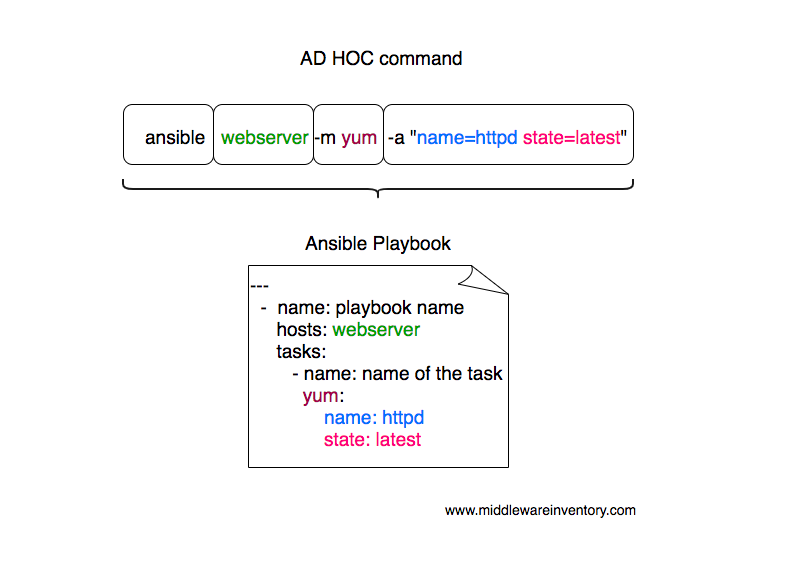
As an example. Let us consider you want to install an Apache Web server against multiple hosts. The following playbook would get it done for you.
Ansible Playbook Example
--- - name: Playbook hosts: webservers become: yes become_user: root tasks: - name: ensure apache is at the latest version yum: name: httpd state: latest - name: ensure apache is running service: name: httpd state: started
this simple ansible-playbook example given above is enough to get your Apache installation done and ready. I sense your anger that I just gave a plain text with no explanation of what do they do.
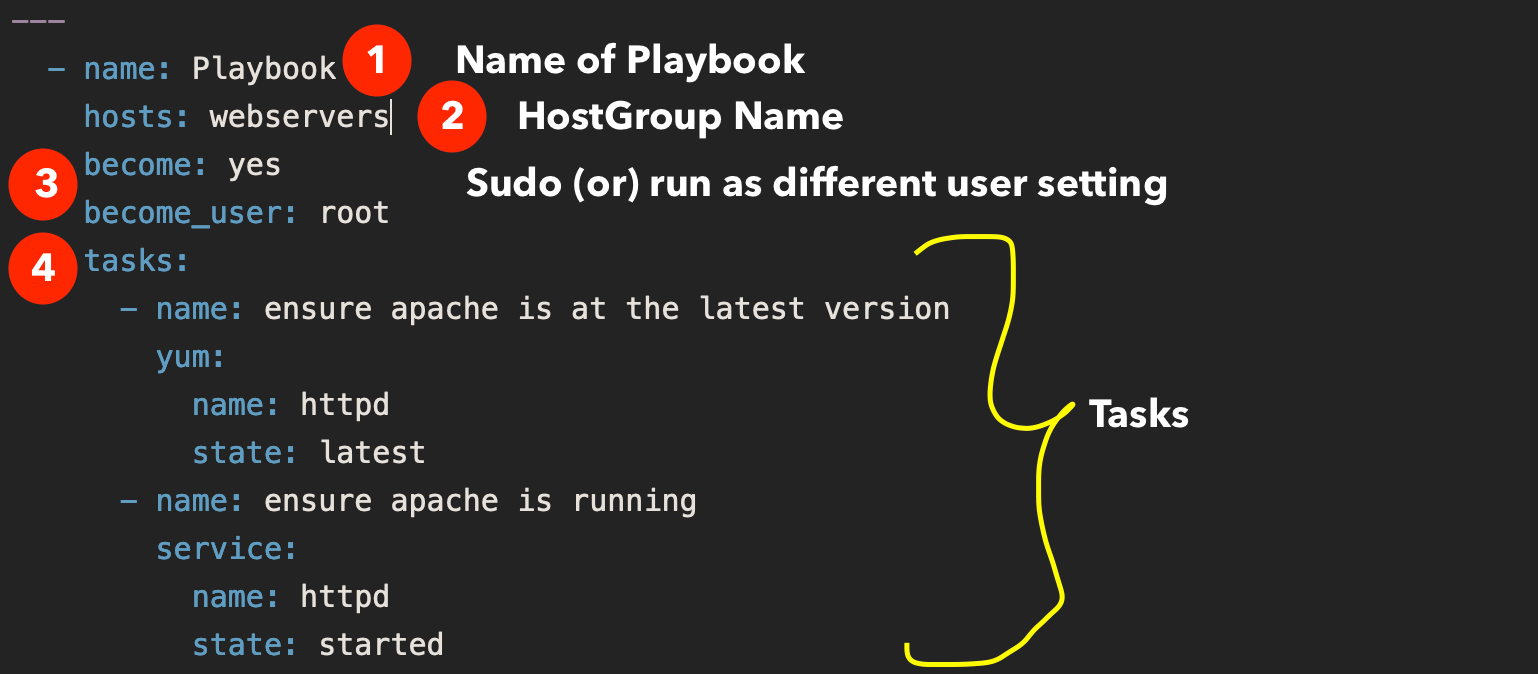
Well, I have explained what each line does
name Name of the playbook
hosts A set of hosts usually grouped together as a host group and defined in inventory file
become To tell ansible this play has to be executed with elevated privileges
become_user the user name that we want to switch to like compare it with sudo su - user
tasks set of tasks to execute, All tasks would be defined below this
and then we have two tasks with two modules, the first module is yum and the second module is service
in the first task with yum the state latest represents that the forementioned package httpd should be installed if it is not installed (or) if it is already installed it should be upgraded to the latest version available. If you do not want it to be upgraded if present, You can change it to state: present
On the Second task with service module, we are making sure that the service named httpd is started and running using the state: started Ansible would not restart the service if it is already started and running.
Ansible Play vs Ansible Playbook?
To understand the ansible-playbook you have to understand the Ansible Adhoc commands.
Ad hoc commands can run a single, simple task against a set of targeted hosts as a one-time command. The real power of Ansible, however, is in learning how to use playbooks to run multiple, complex tasks against a set of targeted hosts in an easily repeatable manner.
Here is something to take away
A play is an ordered set of tasks which should be run against hosts selected from your inventory.
A playbook is a text file that contains a list of one or more plays to run in order.
In the previously given example, you can see we are running all the tasks against a single host group named webservers this is called A PLAY.
If I want to run a different set of tasks against different host group. All you need to do is add one more PLAY.
Remember: A Playbook can have many plays destined to run against a different set of host groups
Every Play must contain
- A set of hosts to configure
- A list of tasks to be executed on those hosts
Think of a play as a wire that connects hosts to tasks.
Example Ansible Playbook with multiple hosts and multiple plays.
Here is the ansible playbook with multiple hosts in it. You can see we are working with web and application servers in the same playbook and executing two different plays (set of tasks) respectively.
--- # Play1 - WebServer related tasks - name: Play Web - Create apache directories and username in web servers hosts: webservers become: yes become_user: root tasks: - name: create username apacheadm user: name: apacheadm group: users,admin shell: /bin/bash home: /home/weblogic - name: install httpd yum: name: httpd state: installed # Play2 - Application Server related tasks - name: Play app - Create tomcat directories and username in app servers hosts: appservers become: yes become_user: root tasks: - name: Create a username for tomcat user: name: tomcatadm group: users shell: /bin/bash home: /home/tomcat - name: create a directory for apache tomcat file: path: /opt/oracle owner: tomcatadm group: users state: present mode: 0755
In the preceding playbook, you could notice that two plays are there and both of them targeted to different host groups.
How to Execute an Ansible Playbook
Ansible playbook can be executed with ansible-playbook command. like you have ansible command to execute ad hoc command. This is dedicated for ansible playbooks
Let us see how to execute the preceding playbook and install apache on the webservers host group
Note*: a host group is a group of hosts and servers mentioned in the ansible inventory file.
➜ Ansible-Examples git:(master) ✗ cat ansible_hosts [webservers] mwivmweb01 mwivmweb02
Here is the customized Ansible inventory file with two hosts grouped aswebservers
Here the host group name is webservers and it is mentioned in the hosts: directive on the playbook
Given below is the command syntax or sample to run an ansible playbook.
➜ ansible-playbook sampleplaybook.yml -i ansible_hosts
If you have mentioned all the host groups in your default inventory file/etc/ansible/hosts then you do not have use -i argument. this is only when you have a customized inventory file like I do.
See this video log for further information on how to execute the playbook in real-time.
How to Dry Run the playbook without making Actual Changes
you can actually run the playbook with Dry Run feature to see what changes would be made to the server without having to perform the actual changes.
to do that. you just have to add -C to your ansible-playbook startup command
➜ ansible-playbook -C sampleplaybook.yml -i ansible_hosts
How to Perform a Syntax Check on the Playbook
If you quickly want to verify if everything is ok with the playbook. You can perform a Syntax check.
Here is the ansible command line example on how to perform Syntax check on ansible playbook. Refer the video for the practical idea.
➜ ansible-playbook --syntax-check sampleplaybook.yml -i ansible_hosts
How to use Variables in Ansible Playbook
Ansible playbook supports defining the variable in two forms, Either as a separate file with full of variables and values like a properties file. or a Single liner variable declaration like we do in any common programming languages
vars to define inline variables within the playbook
vars_files to import files with variables
Let's suppose we want to add a few variables for our webserver like the server name and SSL key file and cert file etc.
it can be done with vars like this
--- - name: Playbook hosts: webservers become: yes become_user: root vars: key_file: /etc/apache2/ssl/mywebsite.key cert_file: /etc/apache2/ssl/mywebsite.cert server_name: www.mywebsite.com tasks: - name: ensure apache is at the latest version yum: name: httpd state: latest - name: ensure apache is running service: name: httpd state: started
and the variables can be referred with the jinja2 template later"{{ variable name }}"
If you want to keep the variables in a separate file and import it with vars_files
You have to first save the variables and values in the same format you have written in the playbook and the file can later be imported using vars_files like this
--- - name: Playbook hosts: webservers become: yes become_user: root vars_files: - apacheconf.yml tasks: - name: ensure apache is at the latest version yum: name: httpd state: latest - name: ensure apache is running service: name: httpd state: started
the content of the apacheconf.yml would like like this
key_file: /etc/apache2/ssl/mywebsite.key cert_file: /etc/apache2/ssl/mywebsite.cert server_name: www.mywebsite.com
to keep things cleaner and to keep your playbook simple, It is recommended to use separate variable files and when you are creating ansible roles, you would have to use the variable files more than defining it inline.
Example Ansible Playbook to Setup LAMP stack
Linux Apache Mysql/MariaDB PHP is shortly called as LAMP stack and it powers most of the internet websites including Facebook.
So let us look at a Sample Ansible Playbook to install LAMP stack with necessary packages and tools.
So what are going to do in this playbook
- Connect to Remote host and execute the following tasks
- Install all necessary packages like Apache(httpd), mariadb, php
- Installing a firewall and enabling HTTP services
- Start the Apache HTTPD web server.
- Start the MariaDB server
- Download a Sample PHP page from remote URL
- Access the website we have built by accessng the URL
Here is the Ansible Playbook example to setup LAMP Stack
--- - name: Setting up LAMP Website user: vagrant hosts: testserver become: yes tasks: - name: latest version of all required packages installed yum: name: - firewalld - httpd - mariadb-server - php - php-mysql state: latest - name: firewalld enabled and running service: name: firewalld enabled: true state: started - name: firewalld permits http service firewalld: service: http permanent: true state: enabled immediate: yes - name: Copy mime.types file copy: src: /etc/mime.types dest: /etc/httpd/conf/mime.types remote_src: yes - name: httpd enabled and running service: name: httpd enabled: true state: started - name: mariadb enabled and running service: name: mariadb enabled: true state: started - name: copy the php page from remote using get_url get_url: url: "https://www.middlewareinventory.com/index.php" dest: /var/www/html/index.php mode: 0644 - name: test the webpage/website we have setup uri: url: http://{{ansible_hostname}}/index.php status_code: 200
Ansible playbook Examples
I have written various Ansible playbooks and I have listed most of them here for your easy access. these articles would have a lot of playbook examples specific to modules and to a single topic.
Conclusion
I hope this article gave you some solid base on what is Ansible playbook and I know you might still have questions. the best way to learn is to explore and practice. So keep writing many playbooks and you can share it with us in the comments or send them to me.
If you want your Playbook to be shared with the world consider uploading it to Ansible Galaxy
If you want your playbook to be published here in DevopsJunction. Share it with us over email or by comment.

Keep Learning.
Cheers,
Sarav AK

Follow us on Facebook or Twitter
For more practical videos and tutorials. Subscribe to our channel
Find me on Linkedin My Profile
For any Consultation or to hire us [email protected]
If you like this article. Show your Support! Buy me a Coffee.
Signup for Exclusive "Subscriber-only" Content
Ansible How To Create A Playbook
Source: https://www.middlewareinventory.com/blog/ansible-playbook-example/
Posted by: anthonyeposis.blogspot.com
0 Response to "Ansible How To Create A Playbook"
Post a Comment